
Automated WeChat Replies with ChatGPT
Download {software_name} now
Overview
The software enables automated responses in WeChat by integrating with ChatGPT, allowing users to receive AI-generated replies when mentioned in private chats or group discussions. Designed for individuals and teams managing high volumes of messages, it streamlines communication by reducing manual response time. The tool is particularly useful for content creators, customer support agents, and social media managers who rely on timely engagement across WeChat platforms. It operates through browser extensions compatible with Chrome and Firefox, requiring access to both WeChat Web and ChatGPT or an OpenAI API key.
Users must log in to WeChat Web at a specific URL with a required parameter to ensure proper functionality. The integration leverages real-time data streams from ChatGPT, though responses are delivered in a single message upon completion due to WeChat’s messaging constraints. This results in a delay of approximately 30 seconds, which is normal and expected. The developer has not provided additional details about the development background or company structure, but the tool includes a public community platform, AI Garden, for user engagement and updates.
Key Features & Capabilities
- ChatGPT-Powered Replies – Automatically generates responses to @mentions in WeChat using ChatGPT’s language model, enabling intelligent, context-aware interactions.
- OpenAI API Key Support – Users can bypass ChatGPT’s web interface by connecting directly via an OpenAI API key, improving stability and reliability.
- Message Queue System – Incoming messages are processed sequentially, minimizing errors and ensuring orderly response handling.
- Browser Extension Compatibility – Works with Chrome and Firefox, allowing seamless integration into existing workflows without requiring native desktop software.
- Web-Based Operation – No installation required beyond browser extension setup; runs entirely within the browser environment.
For example, a content manager can set up the tool to respond to common questions in a WeChat group, such as “What’s the latest update?” or “How do I join?”—with instant, accurate answers. The system ensures that only complete responses are sent, avoiding fragmented or incomplete replies. The use of an API key is recommended for consistent performance, especially when ChatGPT’s web interface is subject to Cloudflare protection, which requires periodic refreshes.
User Interface, Workflow & Performance
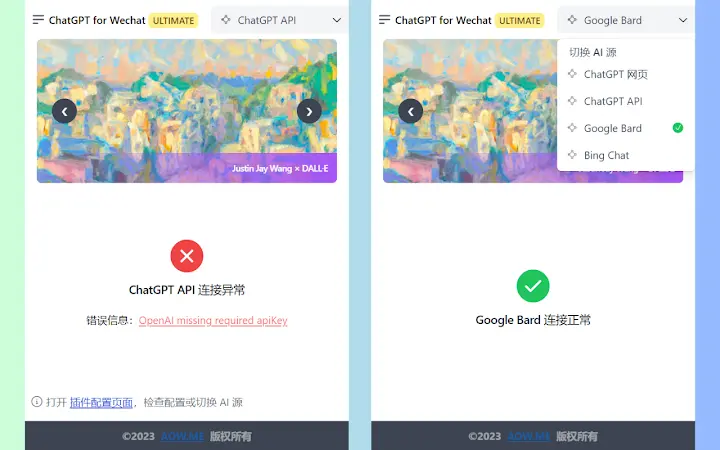
The user interface is minimal and focused on functionality, consisting of a popup panel within the browser extension. It provides basic controls for enabling the automation feature and viewing status indicators. Navigation is straightforward, with no complex menus or settings required. Users can verify the tool’s operation by testing @mentions in a chat and observing the response timing.
Workflow efficiency is high for users familiar with browser extensions and API key management. The process involves logging into WeChat Web with the correct URL, accessing ChatGPT or entering an API key, and enabling the extension. Once configured, the tool runs in the background, monitoring for @mentions and triggering responses automatically. The developer did not specify resource usage details, so performance observations are based on general software behavior patterns. Stability depends heavily on the chosen AI source: OpenAI API connections offer more consistent results than direct ChatGPT web access.
Compatibility & System Requirements
The software is compatible with Windows and Mac operating systems. It functions as a browser extension for Chrome and Firefox, meaning no native desktop installation is required. The installation size is 1.2 MB, indicating a lightweight footprint. The developer did not specify additional system requirements, such as minimum RAM or CPU specifications. Platform compatibility information is limited to the supported OS and browser types.
Users must ensure their devices meet the general requirements for running modern browsers and accessing web services. The tool relies on stable internet connectivity and the ability to access both WeChat Web and ChatGPT or OpenAI endpoints. No specific hardware requirements were provided, and exact performance details were not specified.
Pros and Cons
Pros
- Free to use with no cost barrier for entry
- Supports both ChatGPT web access and OpenAI API key integration
- Lightweight installation at just 1.2 MB
- Operates directly in browser without native app installation
- Message queue system improves reliability and reduces errors
Cons
- Requires manual refresh of ChatGPT web page every 2 hours due to Cloudflare protection
- Response delay of up to 30 seconds due to WeChat’s message delivery constraints
- Dependent on third-party services (WeChat Web, ChatGPT, OpenAI) for core functionality
- No native desktop application—limited to browser-based use
- Requires technical setup, including API key management and correct login URLs
FAQ Section
Is this tool compatible with Windows and Mac?
Yes, the software is compatible with both Windows and Mac operating systems through browser extensions for Chrome and Firefox.
Is the software free to use?
Yes, the software is completely free to use with no subscription or hidden fees.
Do I need an OpenAI API key to use the tool?
While not mandatory, using an OpenAI API key is recommended for more stable performance compared to relying on the ChatGPT web interface.
Can I use this tool offline?
No, the tool requires an active internet connection to access WeChat Web, ChatGPT, or the OpenAI API.
How often do I need to update the software?
The software is updated periodically with new features and bug fixes. Users are encouraged to check for updates through the browser extension store or the official website.
Final Thoughts
This tool offers a practical solution for users seeking automated WeChat interactions powered by ChatGPT. Its lightweight design, browser-based operation, and support for both web access and API integration make it a flexible option for individuals and teams. While it requires some initial setup and has limitations like response delays and dependency on external services, the benefits of automated messaging outweigh the drawbacks for many users. The recommendation to use an OpenAI API key for stability is a strong advantage. For those managing frequent WeChat communications, this tool delivers real value with minimal overhead.
Download {software_name} now







